
I recently tested zero-copy sharing of data from GCP to Snowflake. The data lives in a GCS bucket as an Iceberg table, and Snowflake reads it live, across clouds, with no second copy sitting in Snowflake's own storage and no pipeline moving it there ahead of time.
Worth being precise about what "zero-copy" actually means here, because it's easy to oversell: it means no duplicated storage, not no data movement. Every query still pulls bytes across the network at read time, and that's billed as egress — more on that below. What's actually eliminated is the second copy at rest, and everything that comes with maintaining one: a sync job, staleness, storage you're paying for twice.
What has to be true first
Two dependencies make this work, and skipping either one turns "zero-copy" into a nice diagram that doesn't run.
First, your data has to already be an Iceberg table backed by Parquet, sitting in object storage. Not a database export, not a folder of loose CSVs. Iceberg's table format is what gives a remote engine enough information to safely discover, plan, and read your files without you writing a connector for every downstream tool. The metadata is the whole trick here.
Second, something has to register that table in a catalog a REST-speaking client can reach. On GCP that's BigLake acting as an Iceberg REST catalog, and you have three practical ways to get a table into it:
- Spark (Dataproc Serverless is the cheap path) — the standard way to
CREATE TABLEagainst the catalog and do your initial loads - Dataflow — Beam's managed Iceberg connector can write to the same catalog, which is what you want for streaming ingestion once tables already exist
- Terraform — good for the surrounding scaffolding (buckets, IAM, the workload identity trust), though the catalog and table objects themselves still get created by an actual write engine, not by
terraform apply
Where it breaks down
Before you sell anyone on this pattern, know its two real limits.
Not every engine can do this. Snowflake can, through a catalog-linked database. Spark, Trino, and Flink can, because they have pluggable storage layers and a GCS connector. Athena and Redshift cannot, full stop — I tested this directly. You can register a table pointing at a gs:// path in Glue and it will happily accept it, no validation, no warning. Then Athena fails at query time with a flat "wrong scheme" error, because its read path is hardcoded to S3. If your consumer list includes AWS-native query services, zero-copy federation to GCS is off the table for those engines specifically, no matter how you configure the catalog.
And you pay for every scan. There's no data transfer pipeline to bill once — every query that crosses the cloud boundary gets metered as egress, somewhere in the $90-155 per TB scanned range depending on the provider pair. That's fine, even good, for a table that ten people query twice a month. It's a bad deal for a dashboard that hammers the same hot table every few minutes, or a nightly batch job scanning terabytes on a schedule. Do that math before you commit a workload to this pattern, not after the bill arrives.
Building it, step by step
Here's the actual build, condensed to the parts that matter.
Bucket + catalog. Enable the BigLake API, create a bucket, and register a REST catalog over it with credential vending turned on — this is what lets the catalog hand out short-lived storage credentials per request instead of anyone holding a standing key.
gcloud services enable biglake.googleapis.com --project $PROJECT_ID
gsutil mb -l $REGION -p $PROJECT_ID gs://$BUCKET

gcloud biglake iceberg catalogs create $BUCKET \
  --project $PROJECT_ID \
  --catalog-type gcs-bucket \
  --credential-mode vended-credentials
Write a real table. BigQuery can't create tables in this catalog through DDL, so the actual write goes through Spark. A Dataproc Serverless batch job creates a namespace and table, then inserts a few rows:
spark = (SparkSession.builder.appName("poc-create")
  .config(f"spark.sql.catalog.{CATALOG}", "org.apache.iceberg.spark.SparkCatalog")
  .config(f"spark.sql.catalog.{CATALOG}.type", "rest")
  .config(f"spark.sql.catalog.{CATALOG}.uri", "https://biglake.googleapis.com/iceberg/v1/restcatalog")
  .config(f"spark.sql.catalog.{CATALOG}.warehouse", f"gs://{CATALOG}")
  .config(f"spark.sql.catalog.{CATALOG}.io-impl", "org.apache.iceberg.gcp.gcs.GCSFileIO")
  .getOrCreate())

spark.sql("CREATE NAMESPACE IF NOT EXISTS shared_aws")
spark.sql("""CREATE TABLE IF NOT EXISTS shared_aws.orders (
  order_id BIGINT, customer STRING, amount DECIMAL(10,2), order_ts TIMESTAMP
) USING iceberg""")
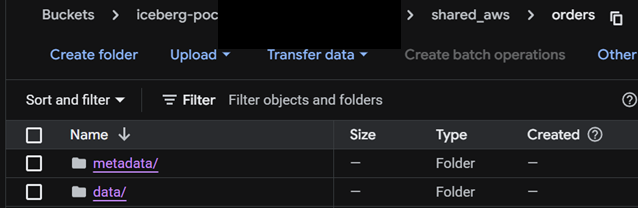
Look inside the bucket afterward and there's nothing exotic — just metadata/ and data/ folders. That's the entire trick of an open table format: it's plain Parquet plus enough JSON and Avro metadata for a remote client to discover schema and file locations on its own.
You can sanity-check the catalog is live without leaving GCP, since BigQuery can read across the same federation:

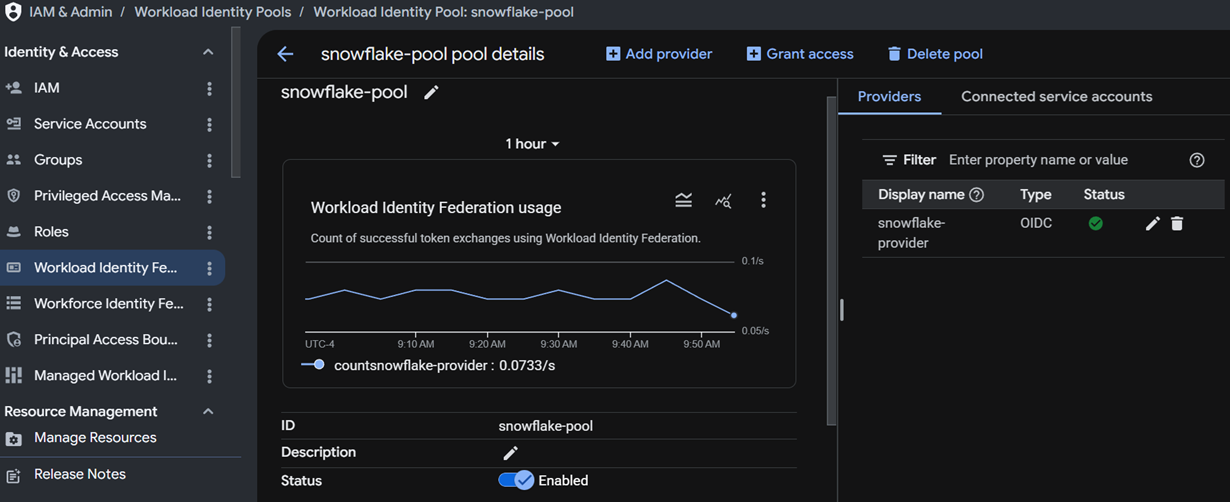
Keyless trust between clouds. This is the part people assume needs a service account key shipped to Snowflake. It doesn't. Snowflake exposes an OIDC issuer URL; GCP creates a workload identity pool trusting that issuer; Snowflake exchanges its own token for a short-lived GCP token at query time. No standing credential exists anywhere.
gcloud iam workload-identity-pools create $POOL_ID \
  --project $PROJECT_ID --location global

gcloud iam workload-identity-pools providers create-oidc $PROVIDER_ID \
  --project $PROJECT_ID --location global \
  --workload-identity-pool $POOL_ID \
  --issuer-uri "<ISSUER_URL_FROM_SNOWFLAKE>" \
  --attribute-mapping "google.subject=assertion.sub"
Then on the Snowflake side, a catalog integration configured for TOKEN_EXCHANGE against that same audience, and a read-only grant back on GCP for the resulting principal. Once it's live, you can watch actual token exchanges happening in the GCP console — this isn't a config that sits idle, it's fired on every query:
The payoff. A catalog-linked database in Snowflake, pointed at the integration, and a plain SELECT:
CREATE OR REPLACE DATABASE shared_gcp_data
  LINKED_CATALOG = ( CATALOG = 'biglake_catalog_int' );

SELECT * FROM shared_gcp_data.shared_aws.orders;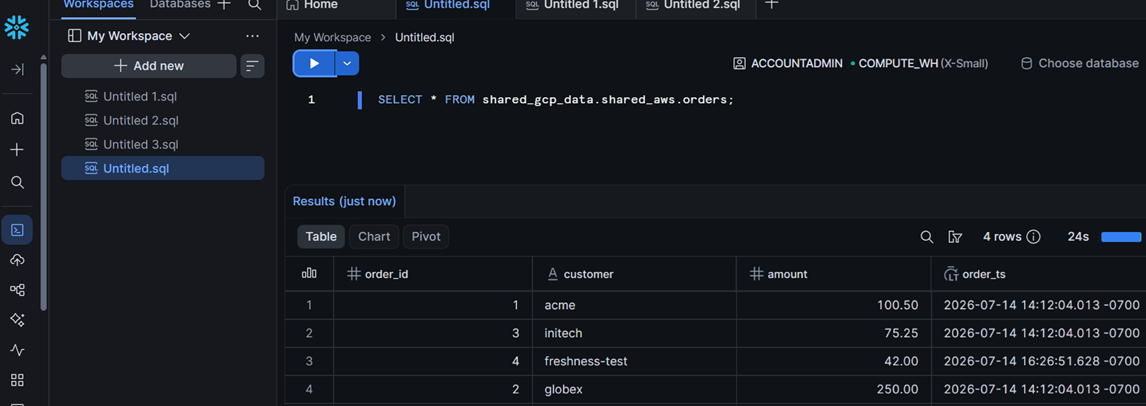
That fourth row in the result is the actual freshness proof — I inserted it on the GCP side and re-ran the same query in Snowflake with no pipeline in between. In practice, a streaming write lands in Iceberg in around 90 seconds, and Snowflake's catalog-linked database picks up new commits somewhere between 1 and 10 minutes later — noticeably looser than the nominal 30-second refresh interval documented for the feature. Measure it yourself before you promise anyone a freshness SLA.
When zero-copy isn't the right call
I also built and tested the two other shapes this problem takes, because the honest answer to "should I always do zero-copy" is no.
Physical replica. Rewrite the table's metadata paths, copy the files to S3, register the copy in a second catalog. Byte-identical, verified two ways — Snowflake and Athena both returned the same row count and the same sum to the cent against the replica. This is the only option if Athena or Redshift are on your consumer list, since they structurally can't federate to GCS. The cost moves from per-query egress to a one-time sync, but the replica is stale between syncs by design, and the rewrite step needs a real Spark job, not an API call.
Direct-write, bypassing GCS entirely. Skip the intermediate cloud and write Iceberg straight into S3 from GCP compute. I proved this works cleanly from Spark — one job, 77 seconds, table created and readable with zero landing infrastructure. It does not work from Dataflow: the credential problem is solvable, but Beam's bundled AWS SDK has an internal dependency-version conflict that has nothing to do with credentials and can't be fixed from pipeline config. If your ingestion runs on Beam and your consumers are AWS-native, you're stuck with a landing-zone-plus-promotion-job split, not a single write.
The comparison, side by side
| Zero-copy federation | Physical replica | Direct-write | |
|---|---|---|---|
| Data movement | None, ever | One sync per refresh | One write, no second hop |
| Consumer reach | Snowflake, Spark, Trino, Flink — not Athena/Redshift | Any engine on the target cloud | Any engine on the target cloud |
| Freshness | Live, ~1-10 min lag | Stale between syncs | Live, as fresh as the write job |
| Cost shape | Per-query egress ($90-155/TB scanned) | One-time sync cost, then free reads | One-time write cost, then free reads |
| New moving parts | None | Rewrite job + sync schedule | None on Spark; a promotion job on Beam |
| Best for | Long-tail tables, infrequent reads | Hot tables, or AWS-native-only consumers | New pipelines where you already know the consumer cloud |
The pattern that gets the least attention in most architecture decks is the last one. If you're standing up a new ingestion pipeline and you already know your consumers live on another cloud, writing there directly beats writing to your home cloud and copying later — same egress cost either way, half the storage, and one less system to run. Zero-copy federation is the right default when you don't have that luxury. Know which situation you're actually in before you pick.
0 Comments
Leave a Comment